



Support Package Manager — Documentation and Tutorials
Find all the resources you need to install, configure, and use Support Package Manager in Perfex CRM.
Installation and Requirements
▪️ Perfex CRM 3.4.x
▪️ PHP 8.3, 8.4, or 8.5
▪️ Backing up your files and database is recommended before installation.
Install the Module
- download the module ZIP file;
- in Perfex CRM, go to Setup → Modules;
- upload and install the module;
- activate Support Package Manager;
- enter your license key or start the 14-day trial.
For the complete procedure, watch the installation video tutorial.
Video Tutorials – Brand-new tutorials are coming soon!
Get up and running with the module quickly
Install and activate the module, then start the trial period.
Duration: 3 min
Create and assign a support package
Duration: 5 min
Deduct units and view the usage history
Duration: 3 min
View support packages from the client area
Duration: 2 min
View the full documentation
Find all the information you need to install, configure, and use Support Package Manager in the complete documentation.
Document version: 1.0.0
Language: English
Compatibility: Perfex CRM 3.4.x — PHP 8.3, 8.4, and 8.5
The documentation covers:
▪️ installation;
▪️ creating support packages;
▪️ unit tracking;
▪️ renewals;
▪️ cancellations;
▪️ the cron job;
▪️ and client access.
Compatibility and Updates
Support Package Manager is currently compatible with:
▪️ Perfex CRM 3.4.1
▪️ PHP 8.3, 8.4, and 8.5
Before updating Perfex CRM, PHP, or the module, we recommend creating a complete backup of your files and database.
Module Updates
Support Package Manager updates include fixes and improvements released for this edition of the module, within the range of supported Perfex CRM versions.
They are included with the purchased license, with no annual subscription, subject to the terms applicable on the date of purchase.
The following services are not included:
▪️ installation or migration;
▪️ adaptation to custom development;
▪️ resolving conflicts with third-party modules;
▪️ customization of functionality or the user interface.
Before Updating Perfex CRM
We recommend checking Support Package Manager compatibility before installing a new version of Perfex CRM.
You can refer to this page to see the currently supported versions and any applicable update recommendations.
Activate and Manage Your License
After installing the module, you can activate Support Package Manager using your license key or start the free 14-day trial.
Activate the License
1. Open the license management page in Support Package Manager.
2. Enter the key you received after purchase.
3. Confirm the activation.
The license is then associated with the domain name or subdomain used by your Perfex CRM installation.
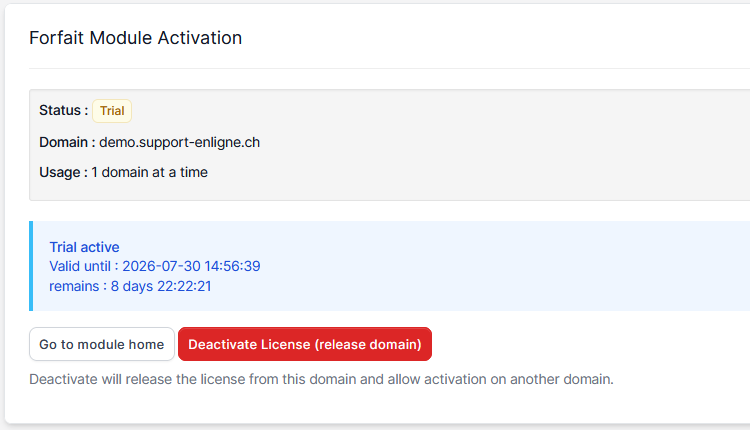
Identify the Activated Domain
The license management page shows the domain currently associated with the key.
A license is valid for one installation linked to a domain name or subdomain.
Deactivate the License
Before moving your installation or changing your domain name, deactivate the license from the current installation.
This releases the key so it can be used on another domain.
Transfer the License to Another Domain
To transfer your activation:
1. deactivate the license on the current domain;
2. install the module on the new instance;
3. enter the same license key;
4. activate it on the new domain.
End of the Trial Period
At the end of the 14-day trial, access to the module’s features is suspended.
You can then:
▪️ purchase a license and reactivate the module;
▪️ keep the tables and data for later activation;
▪️ completely uninstall the module and remove its tables.
Uninstalling the module does not alter native Perfex CRM data, including support tickets.
Need Help with the Module?
First, check the documentation and tutorials available on this page. They cover installation, configuration, support package usage, license management, and the module’s main operations.
If the issue persists, you can contact support and provide:
▪️ the Perfex CRM version you are using;
▪️ your PHP version;
▪️ your Support Package Manager version;
▪️ the steps required to reproduce the issue;
▪️ any error messages displayed;
▪️ a screenshot, when it may help with diagnosis.
Support covers, in particular:
▪️ license activation issues;
▪️ reproducible module malfunctions;
▪️ errors encountered during installation or updates when they are directly related to the module.
The following are not included:
▪️ customizations;
▪️ changes to functionality or the user interface;
▪️ adaptation to custom development;
▪️ conflicts caused by a third-party module, theme, or custom modification of Perfex CRM;
▪️ general administration of your server or Perfex CRM installation.
Vous n’utilisez pas encore Support Package Manager ?
Découvrez le module et testez toutes ses fonctionnalités gratuitement pendant 14 jours sur votre installation Perfex CRM.